Since the MicroLogix 1100 has only 10 inputs and 6 outputs, why not design something for it? what about an elevator? So, this post will be an elevator setup for a three story building. We will be using LEGO Mindstorms because we have a few around, but you can design another model.
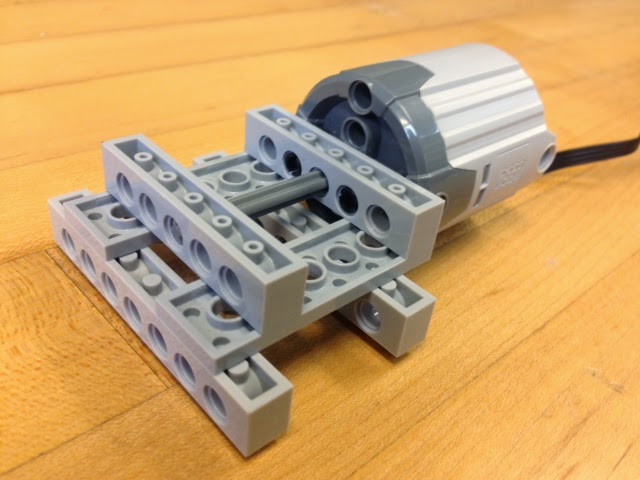
Outputs (4 for now): motor up, motor down, up lights and down lights. You may add a motor to open/close the elevator doors. Inputs (10): three sensors for floor level sensing, three floor selection buttons (the ones inside the elevator), and four buttons for calling the elevator (the ones outside the elevator) For now, just the pics: |
Debido a que el MicroLogix 1100 tiene solo 10 entradas y 6 salidas, ¿Por qué no diseñar algo con ello en mente? ¿Qué tal un elevador? Este entrada es para un elevator de tres pisos. Usaremos LEGO Mindstorms porque lo tenemos disponible, pero puedes otro estilo.
Salidas (4 for ahora): subir y bajar para el motor, luces que indican si sube o baja. Puedes añadir otro motor para abrir y cerrar las puertas del elevador. Entradas (10): tres sensores para detectar en que piso está, los tres botones de dentro del elevador, y 4 botones fuera del elevador. Por ahora, solo las fotos: |
 |
 |
 |
 |
 |
 |
 |
 |
 |
 |
 |
 |
 |
 |
 |
 |
 |
|
| You need to add the sensors for the floor level: to determine where the elevator is, 1st, 2nd or 3rd floor (I don't have a pic of that one!). You may have to use the best switch you can find for the job. You also need the control panel: the buttons and lights. The three buttons inside the elevator and the four buttons outside (one on the 1st floor to go up, one on the third floor to go down, and two for the middle floor to go up and down). |
Tienes que añadir los sensores de nivel: para determinar en que piso está el elevador, el 1ro, 2do o 3ro (No tengo esa foto!). Es probable que tengas que buscar el mejor interruptor que sirva para ese trabajo. También hace falta el panel de control: los botones y las luces. Son los tres botones dentro del elevador y los cuatro fuera de el (uno en el 1ro para subir, uno en el último para bajar, y dos en la mitad para subir y bajar). |
.JPG) La tarjeta del panel de control |
.JPG) La tarjeta del panel de control |
Showing posts with label PLC Projects. Show all posts
Showing posts with label PLC Projects. Show all posts
Tuesday, September 16, 2014
PLC Elevator

Sunday, September 14, 2014
PLC Lights and Switches
| The next challenge will use the board on the image below. There are several options with this one. You can use the lights on the right or the traffic lights. This board has 2 push-buttons (normally open) and two switches with two positions (two outputs per switch) for a maximum of six inputs. The third generation of this board has 5 different switches for a maximum of 9 inputs. There are six LED lights on the right and the wiring for the traffic light also was designed for also controlling 6 outputs (2 green lights, 2 red, lights and 2 yellow lights). |
El siguiente desafio usará la tarjeta de la imagen de abajo. Hay varias opciones con esta tarjeta: puedes usar las luces de la derecha o las del semáforo. Esta tarjeta tiene dos pulsadores (normalmente abiertos) y dos interruptores de doble posición (dos salidas por interruptor) para un máximo de 6 salidas. La tercera generación de esta tarjeta tiene 5 interruptores diferentes para un máximo de 9 salidas. Hay 6 luces LED en la derecha y el cableado del semáforo está diseñado para controlar también 6 luces (2 rojas, 2 verdes y 2 amarillas). |
The board will be used for two tasks:
|
La tarjeta será usada para dos tareas:
|

The Lights & Switches board / La tarjeta de Luces e Interruptores
|
|
1st part of the challenge (warming up):
2nd part of the challenge (still warming up):
3rd part "The Challenge": The program should be able to make the 1st part and the 2nd part of the challenge but on the same code: without the coding for the switches of the first part affecting the running lights code. The should run as if they were individual. |
Primera parte del desafío (calentamiento):
2da parte del desafío (aun calentando):
3ra parte "El Desafío": El programa ahora debe de correr la 1a y 2da parte del desafío en el mismo código sin que el código de la primera parte afecte al de las luces. Deben de correr como si fueran codigos independientes. |
After "The Challenge", you can start planning about the traffics light programming. |
Después de "El Desafío", puedes planificar acerca de la programación de las luces del semáforo. |
| If you design your own board, you may improvise as you see fit. My first board (photo below) was not a elegant an clean as the second generation. | Si diseñas tu propia tarjeta, tendrás que improvisar según sea necesario. Mi primera tarjeta (foto de arriba) no es tan elegante ni tan limpia como la de la segunda generación. |

First prototype board / Primer prototipo de tarjeta
|
|
Subscribe to:
Posts (Atom)